KaraDan' Karaoké

  • Already use basic karaoke software, or YouTube?
  • Still take requests on paper?
  • Use your own karaoke files?
  • Work in venues with a poor internet connection?

Then the KaraDan app is made for you.

  • No commitment
  • No internet
  • The fair rotation sorts requests automatically

On a Mac? Download the Mac version

For Windows 10 and 11, and for Mac (macOS 11 or later). The trial is complete for 14 days, with no account and no credit card. Screens in English, French, Spanish, Portuguese, German and Italian.

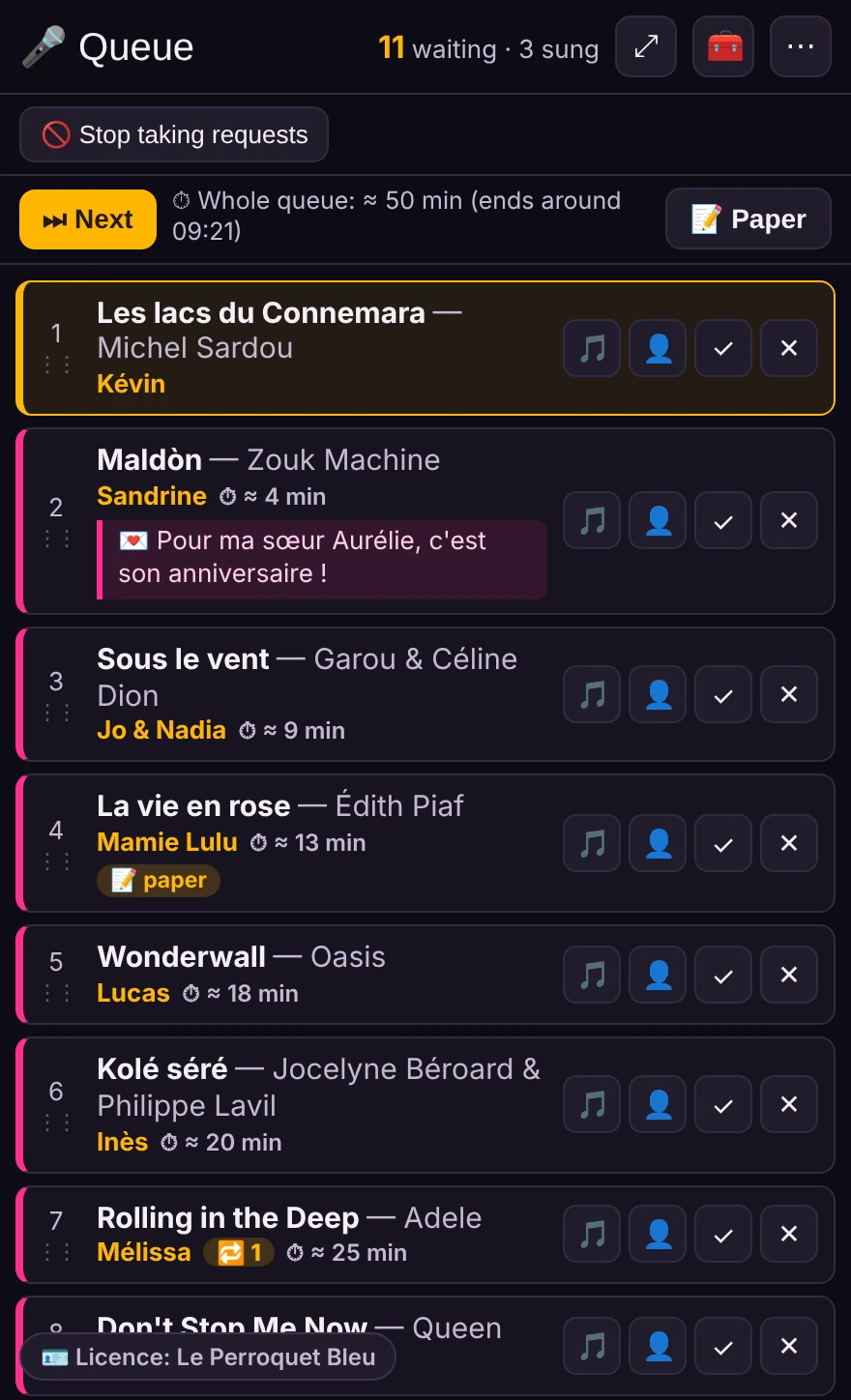
The host's screen: the queue showing, for each request, the song, the singer and the estimated wait.
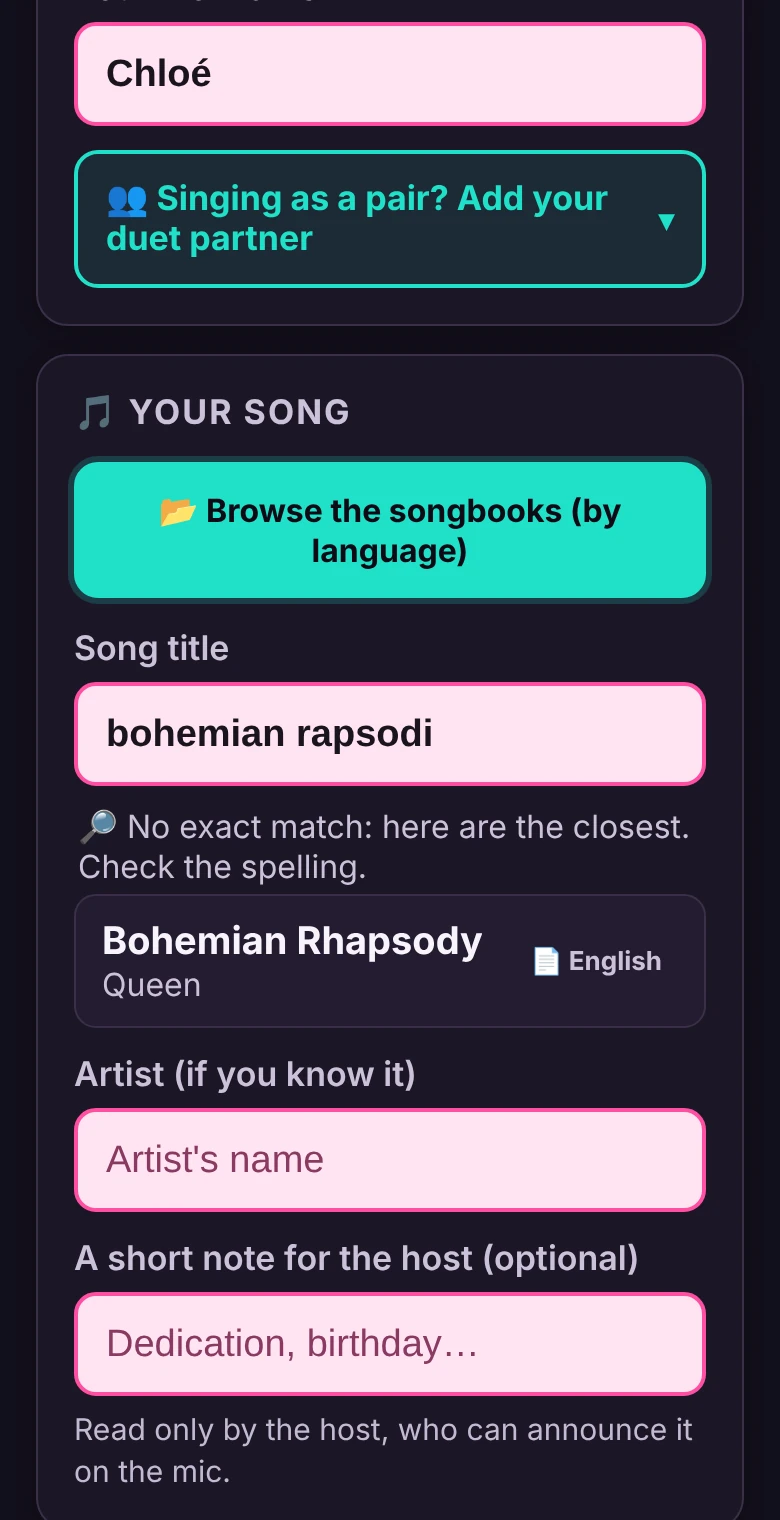
A singer's phone: she types “bohemian rapsodi” and the app suggests Bohemian Rhapsody by Queen.

A night, in three steps

Nothing to install on phones, no account to create: your singers scan and choose.

  1. The app gives you a QR code

    Download it, and print it.

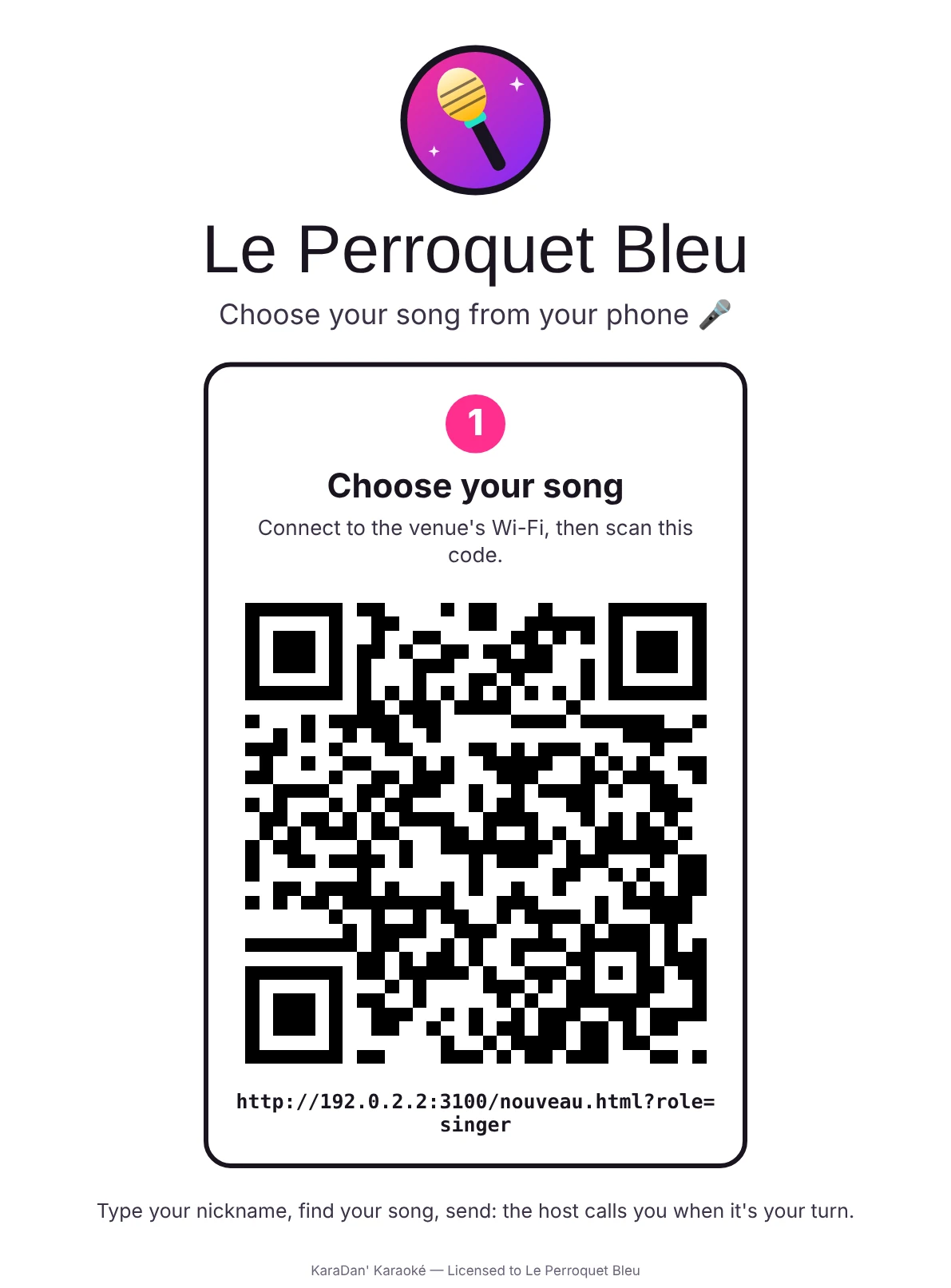
    The poster to print: the venue's name, an invitation to choose a song from your phone, and a large QR code.
  2. The singer scans and chooses

    They type a nickname, search your songbook and send. The search forgives typos, and they can add a duet partner or a short note for you.

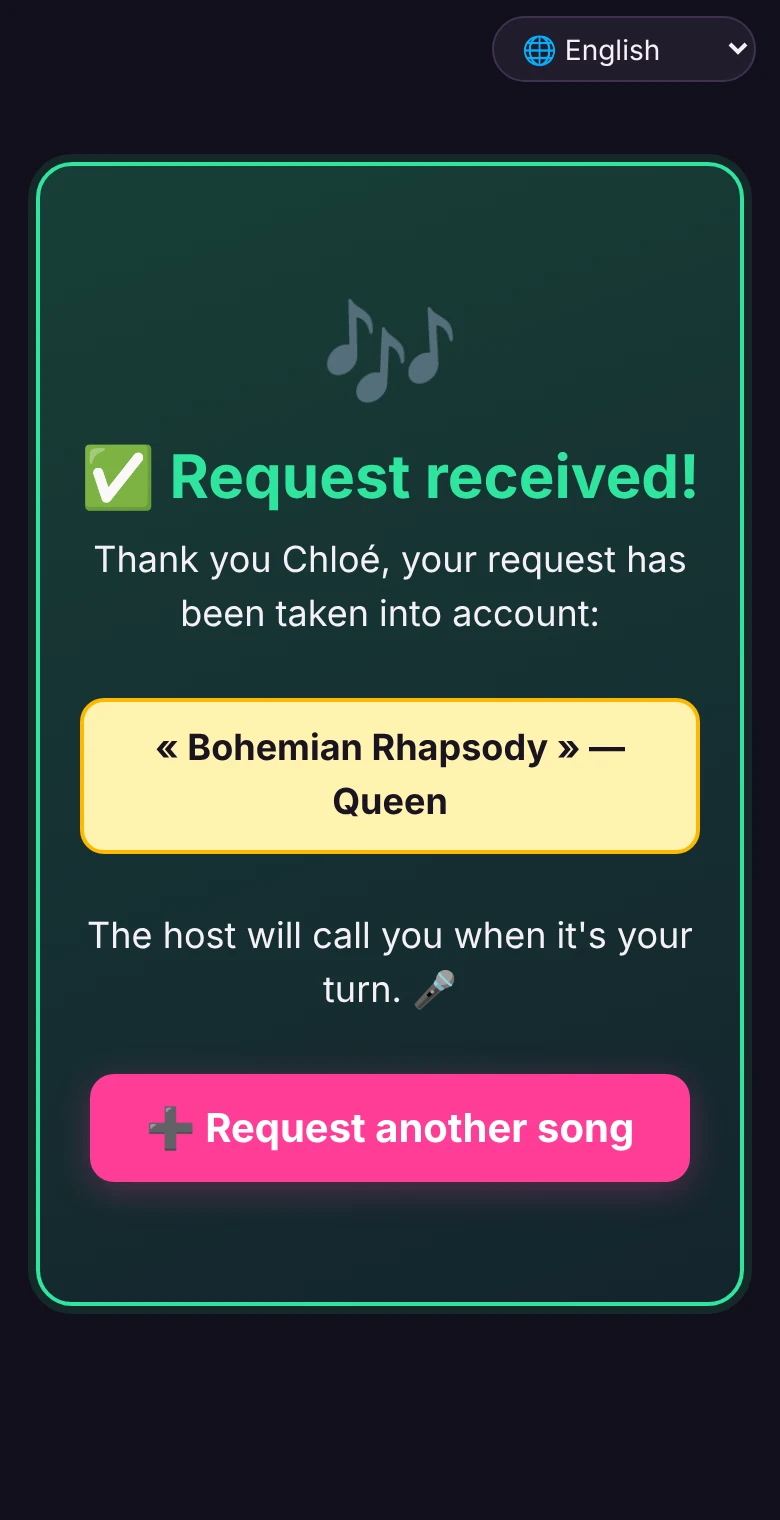
    The singer's phone after sending: the request is received, the host will call them when it's their turn.
  3. Requests land in your queue

    They sort themselves automatically, so requests are shared out fairly. The “Next” button marks the performance as sung and copies the next song, ready to paste into your karaoke software.

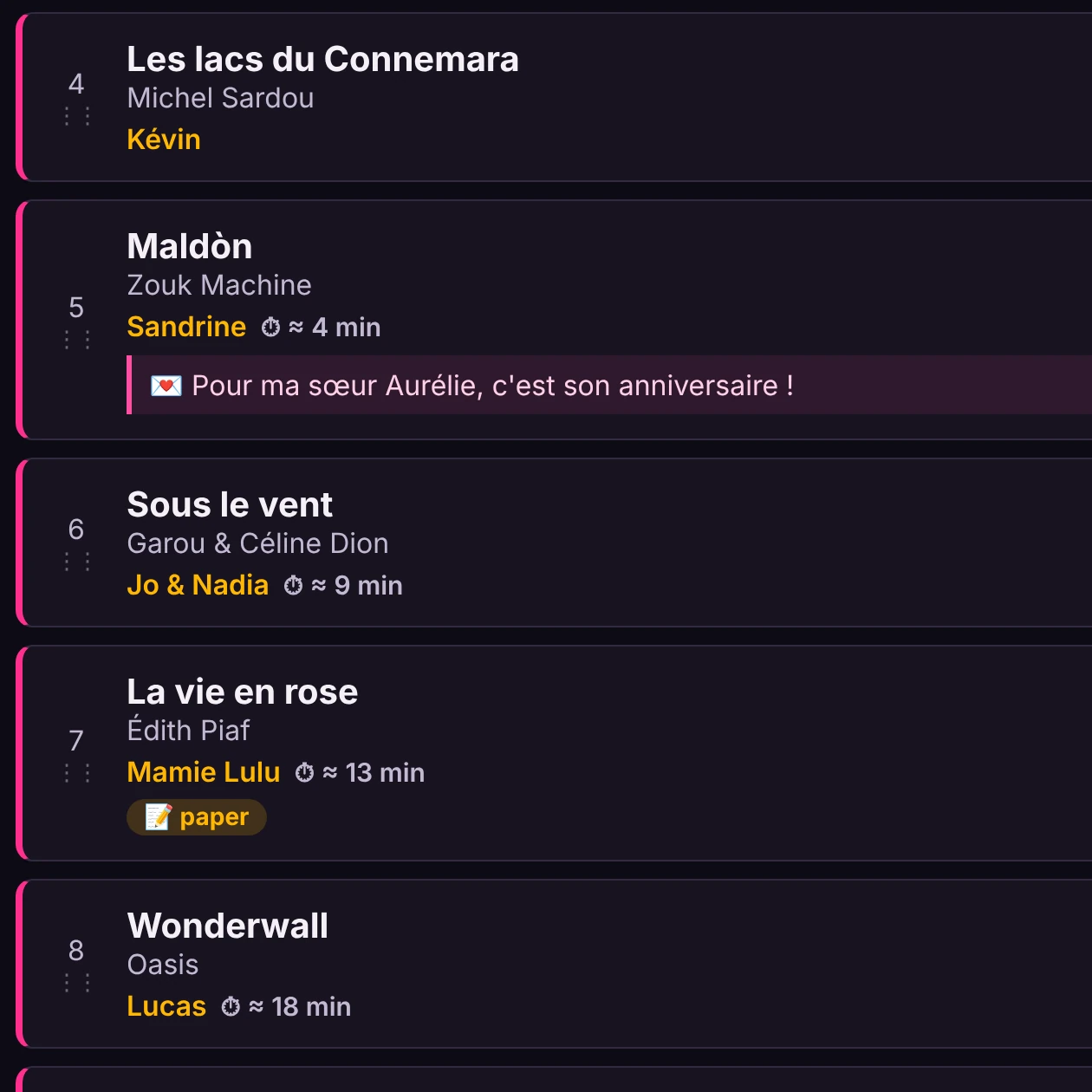
    The host's queue: a dedication under Sandrine's request, a duet, a request taken on paper, and the wait next to each singer.

What the queue does for you

You host, it keeps count.

A fair share for everyone
The fair rotation gives every singer one turn per round. Someone who sends three songs in a row doesn't sing three times before the others.
Paper requests…
A regular still hands you a slip of paper? You type it in within seconds and it takes its place in the same queue.
“When is my turn?”
The estimated wait shows next to each request, based on how long performances really take that night.
Dedications and duets
The singer's note appears under their request, for your eyes only, ready to announce on the mic. A duet counts for both singers in the rotation.
Duplicates flagged
An alert tells you when a song has already been sung or requested tonight, and when it isn't in your songbook.
Last call announced
A button, or a set time, closes requests: the announcement appears on phones automatically.
Your regulars recognised
Each singer finds the songs they have already sung at your nights. Nicknames spelled in different ways can be merged into one — you decide.
The night's report
An Excel file lists the most requested songs and your regulars, to keep as a record if you want one.
A kiosk for guests without a phone
A second computer or a tablet becomes a self-service kiosk: each person picks a song there, then the screen resets for the next one. Nothing is kept from one singer to the next, and these requests carry a “kiosk” label in your queue.
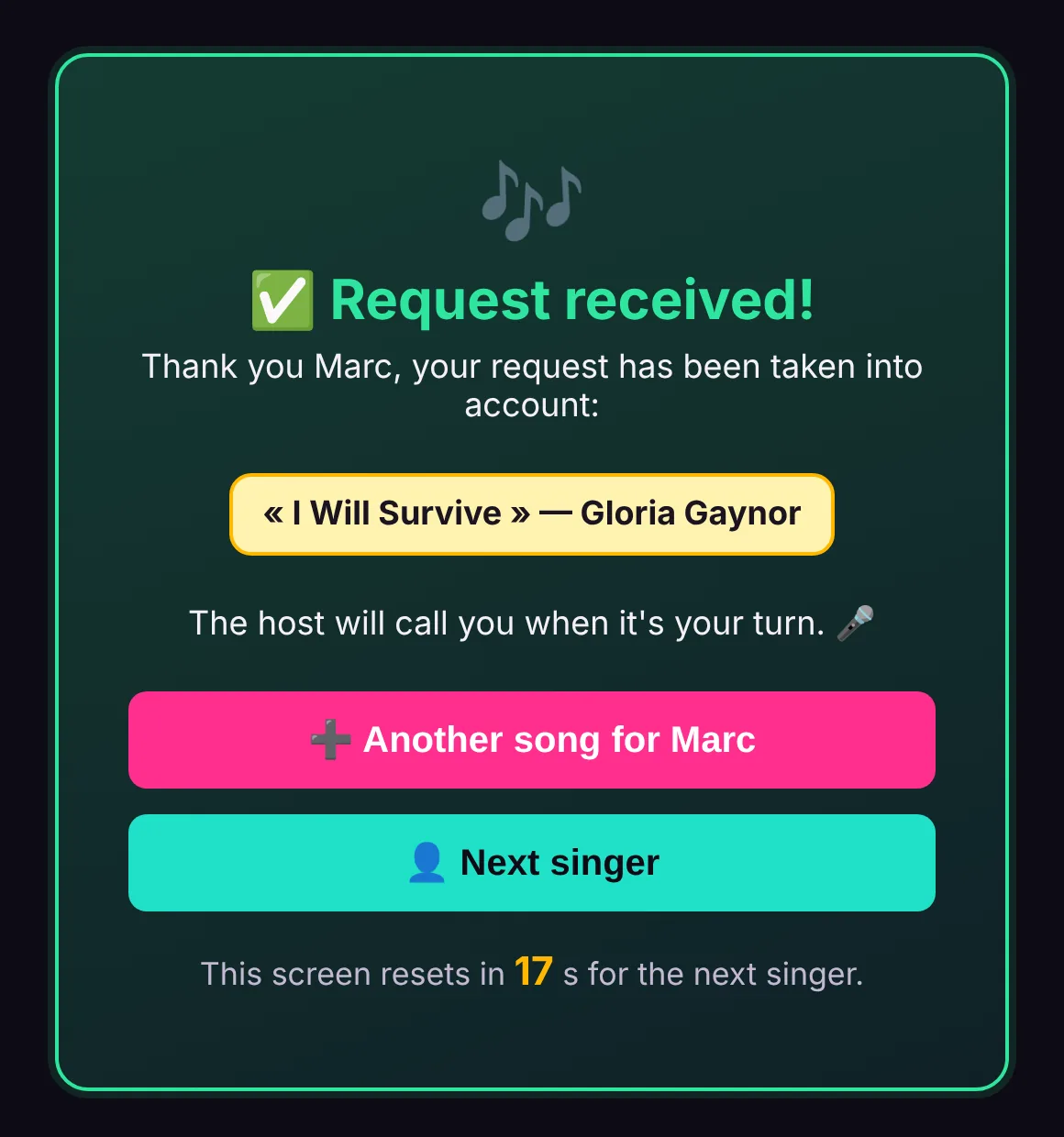
The kiosk after sending: “Request received!”, the “Another song for Marc” and “Next singer” buttons, and the screen resetting in a few seconds.
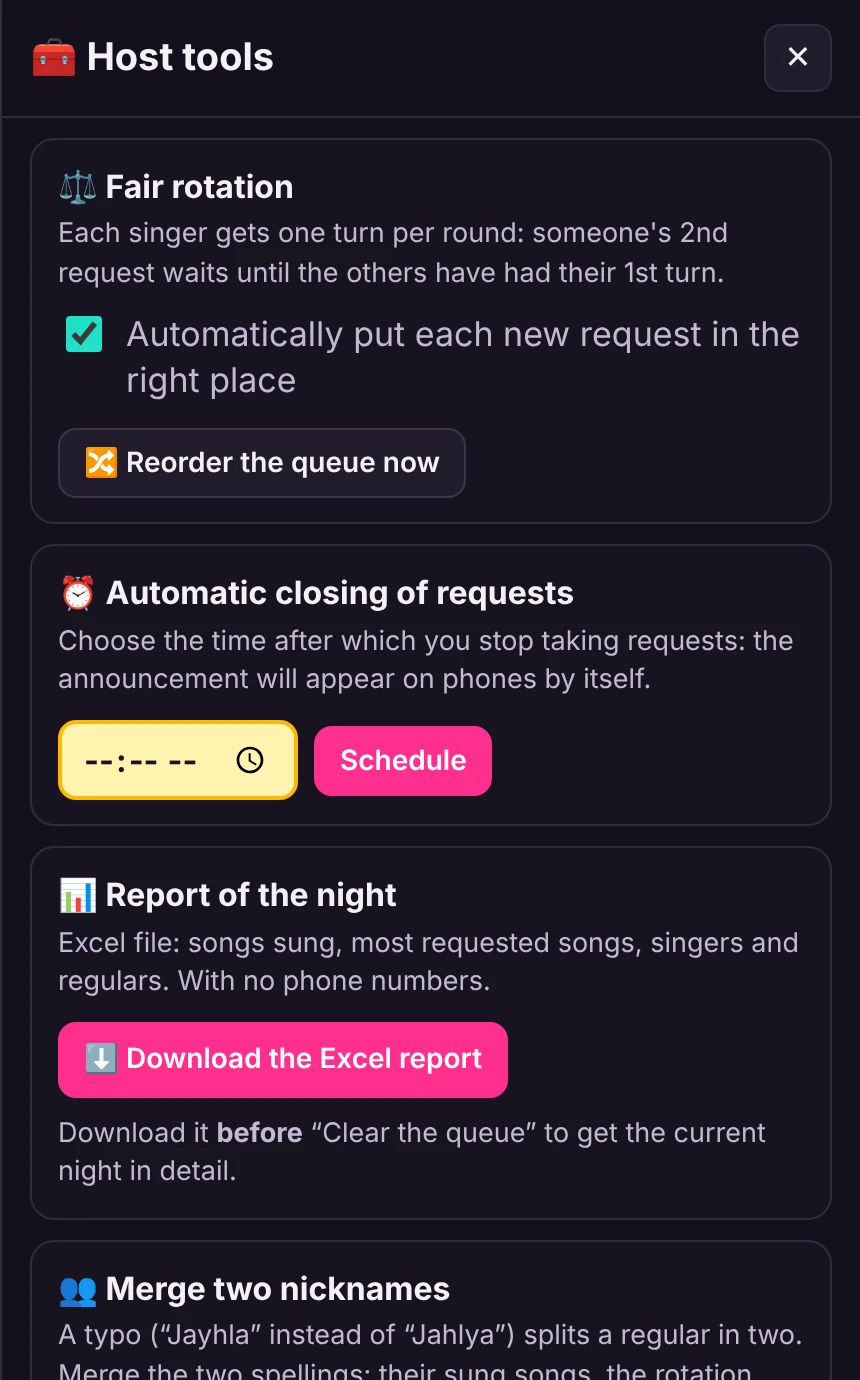
The host's tools: fair rotation, automatic closing of requests, the night's report as an Excel file.

On the bar's TV

The public screen shows who is on the mic and who is up next. Drag the window onto the TV and the room knows where things stand.

There is also a compact screen for you: the queue fits in a narrow column, to keep beside your karaoke software.

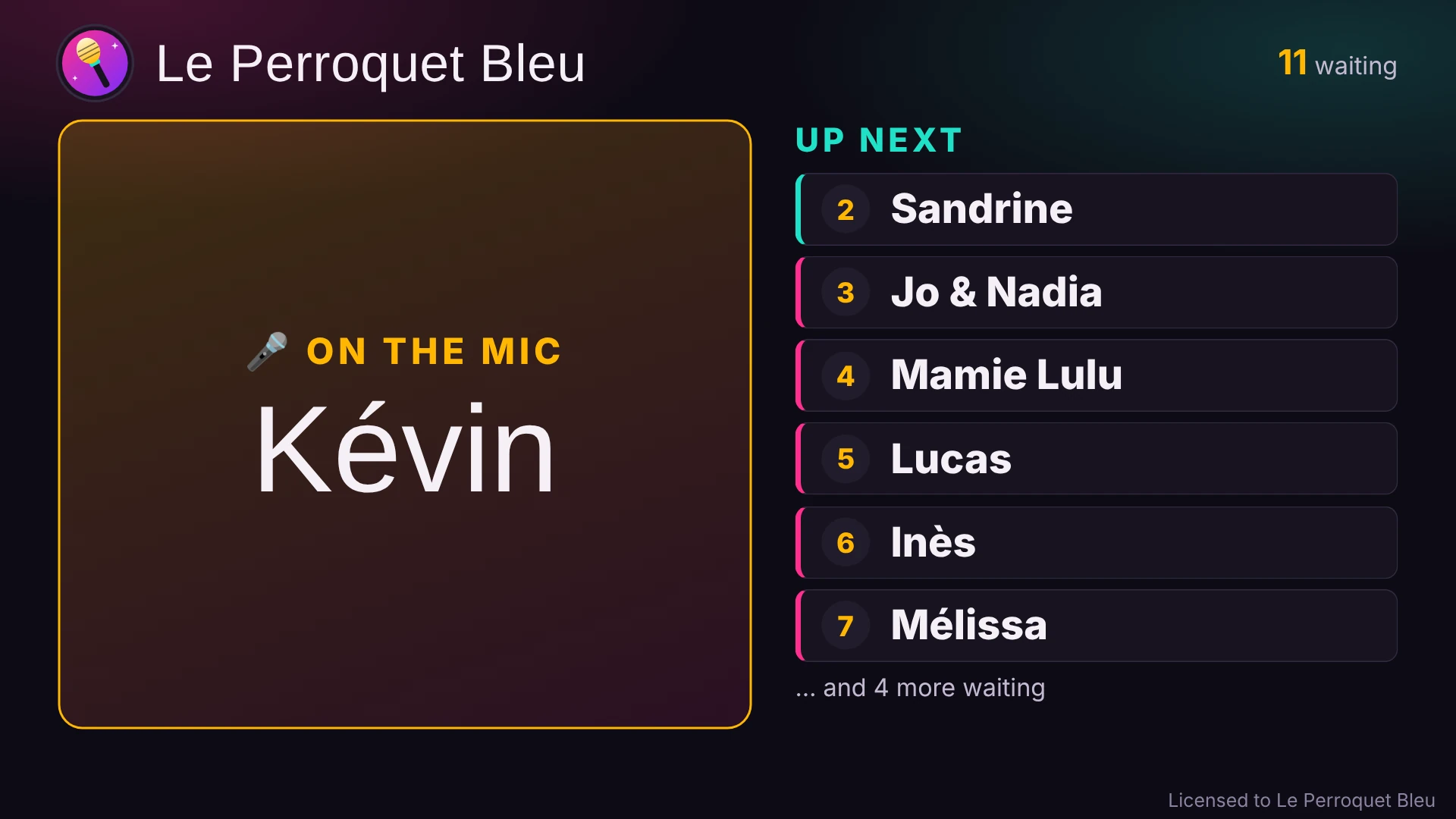
The public screen: Kévin is on the mic, followed by the list of the next singers.

Good to know

What the app does, and what it doesn't.

  • It runs the queue, not the music. KaraDan' Karaoké works alongside your usual karaoke software, whichever it is. It contains no music and no lyrics.
  • Your songbook, not ours. You import your own song list: a CSV table, the export from your karaoke software or a plain “Title - Artist” list. A demo songbook is included so you can try it right away.
  • A computer running Windows 10 or 11 (64-bit), or a Mac (macOS 11 or later). The singers' phones can be any brand.
  • The venue's Wi-Fi is enough. The computer and the phones must be on the same network. No internet is needed during the night.
  • Everything stays on your computer. Nothing about your nights or your singers goes to the internet. Singers are only asked for a phone number if you turn on the “WhatsApp group” option, and it is erased in one click.
  • The app speaks English. The host and singer screens come in English, French, Spanish, Portuguese, German and Italian, and each singer can pick their own language on their phone. The included guide and the e-mail that carries your key are in French for now.

The screenshots on this page show the app with a fictional venue and fictional singers.

Choose your plan

14 days of full trial, with no credit card. After that, a subscription with no commitment: you stop whenever you like.

Founder's rate. The first 20 subscribers keep today's price for as long as their subscription runs, even if prices go up later. All 20 spots are still open.

Basic

For the occasional night

€5.75per month

that is €69 paid once a year, instead of €82.80

€6.90per month

paid every month, no commitment

  • Requests from the phone, with a QR code
  • A search that forgives typos
  • The queue, with the fair rotation
  • The “Next” button, which copies the next song
  • Typing in requests received on paper
  • The poster to print, with your QR code
  • 1 computer
Choose Basic Choose Basic

Our pick

Pro

For hosting every week

€8.25per month

that is €99 paid once a year, instead of €118.80

€9.90per month

paid every month, no commitment

Everything in Basic, plus:

  • The public screen, for the bar's TV
  • The kiosk, for singers without a phone
  • Each singer's estimated waiting time
  • Dedications and duets
  • Duplicate alerts
  • Scheduled closing of requests
  • Your regulars recognised, with the songs they have already sung
  • The night's report, as an Excel file
  • 2 computers: the one for your nights and a spare
Choose Pro Choose Pro

File search app included

Complete

Karaoke, blind test and games

€12.42per month

that is €149 paid once a year, instead of €178.80

€14.90per month

paid every month, no commitment

Everything in Pro, plus:

  • KaraDan' Blind Test, in full
  • Your music started with one click, four choices on every phone
  • Points and the speed bonus, counted for you
  • Solo or in teams, with the ranking on the TV
  • A single key, 2 computers for each app
  • Plus: Carton Plein and Bonneteau, two party games
  • Free gift: Recherche de fichiers, our file search app (sold for €19). It stays yours, even if you stop the subscription.
  • For now, the blind test and Recherche de fichiers have French screens.
Choose Complete Choose Complete

Haven't tried it yet? Download the free trial: every feature for 14 days, then you choose. TVA non applicable, art. 293 B du CGI.

What you pay, and what you no longer have to do

Six reasons to leave the queue to the app.

€1.91 per night
That is what the Pro plan costs when paid yearly, for one night a week. Work it out for your own nights just below.
You only pay when you host
With monthly billing, a quiet season costs you nothing: you stop, and start again later. Your songbook, your settings and your regulars wait for you on your computer.
The venue doesn't need internet
Everything goes through the venue's Wi-Fi, between the phones and your computer. A poor connection doesn't spoil the night.
Your software and your files stay the same
The app runs the queue; it doesn't play the songs. It works alongside your usual karaoke software, whichever it is.
No more slips of paper, no more “whose turn is it?”
The fair rotation gives every singer one turn per round. Someone who sends three songs in a row doesn't sing three times before the others.
Designed by a host, for his own nights
Every feature comes from a need met at the microphone. New features are included for as long as you subscribe, and the host himself answers your emails.

The three plans, line by line

Everything ticked in Basic is also in Pro, and everything in Pro is in Complete.

FeatureBasicProComplete
KaraDan' Karaoké
Requests from the phone, with a QR codeYesYesYes
Search that forgives typosYesYesYes
Queue and fair rotationYesYesYes
“Next” button: copies the next songYesYesYes
Typing in requests received on paperYesYesYes
Poster to print, with your QR codeYesYesYes
Screens in six languagesYesYesYes
Public screen for the TVNoYesYes
Kiosk for singers without a phoneNoYesYes
Estimated waiting timeNoYesYes
Dedications and duetsNoYesYes
Duplicate alertsNoYesYes
Scheduled closing of requestsNoYesYes
Regulars recognised, songs already sungNoYesYes
Night's report as an Excel fileNoYesYes
Computers per key122
Blind test
KaraDan' Blind Test, in fullNoNoYes
Party games
Carton Plein (party bingo)NoNoYes
Bonneteau (cups game)NoNoYes
Free gift
Recherche de fichiers, file search app (sold for €19)NoNoIncluded
Price
Paid monthly€6.90€9.90€14.90
Paid yearly€69€99€149

In the Complete plan: the blind test

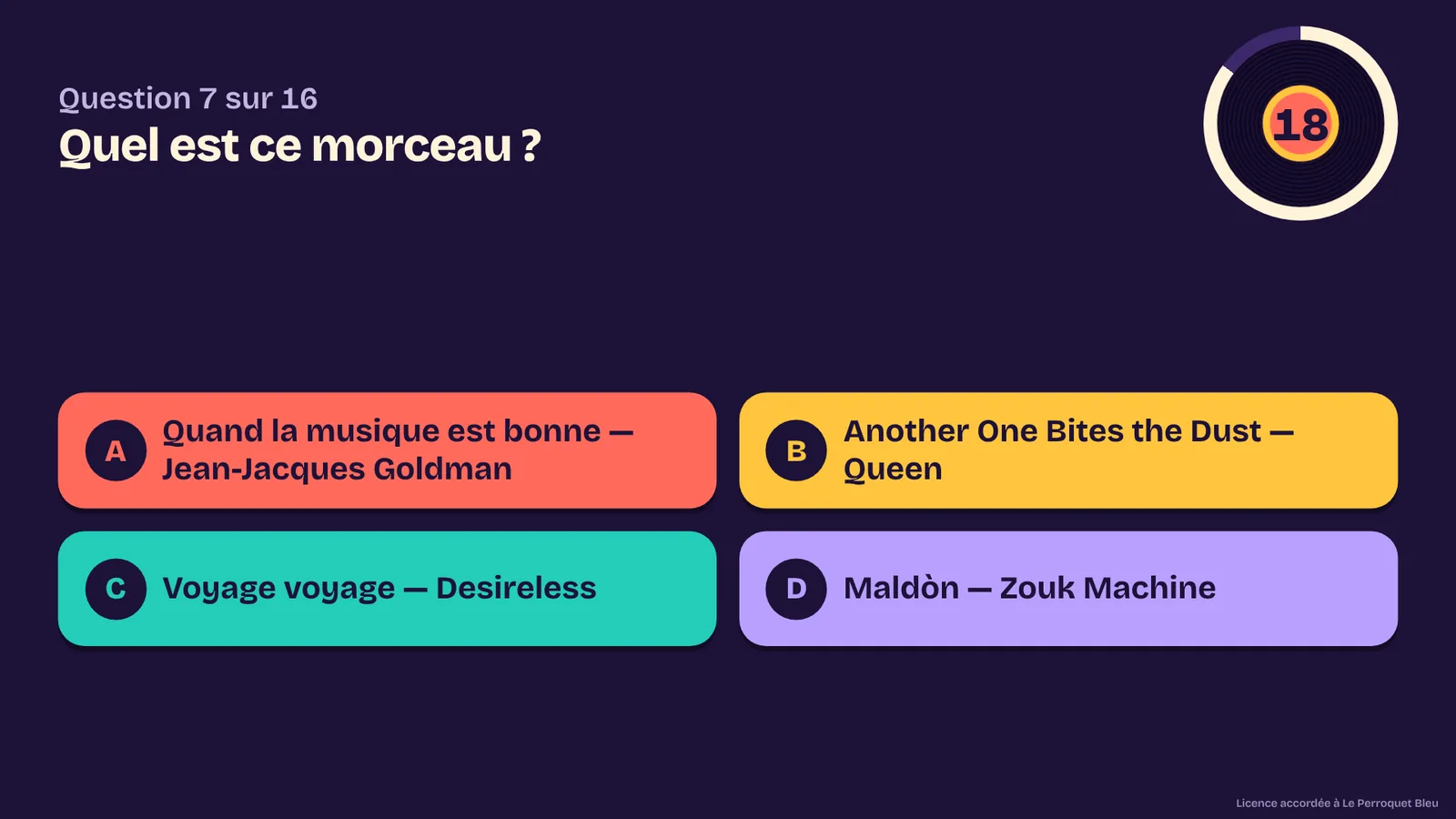
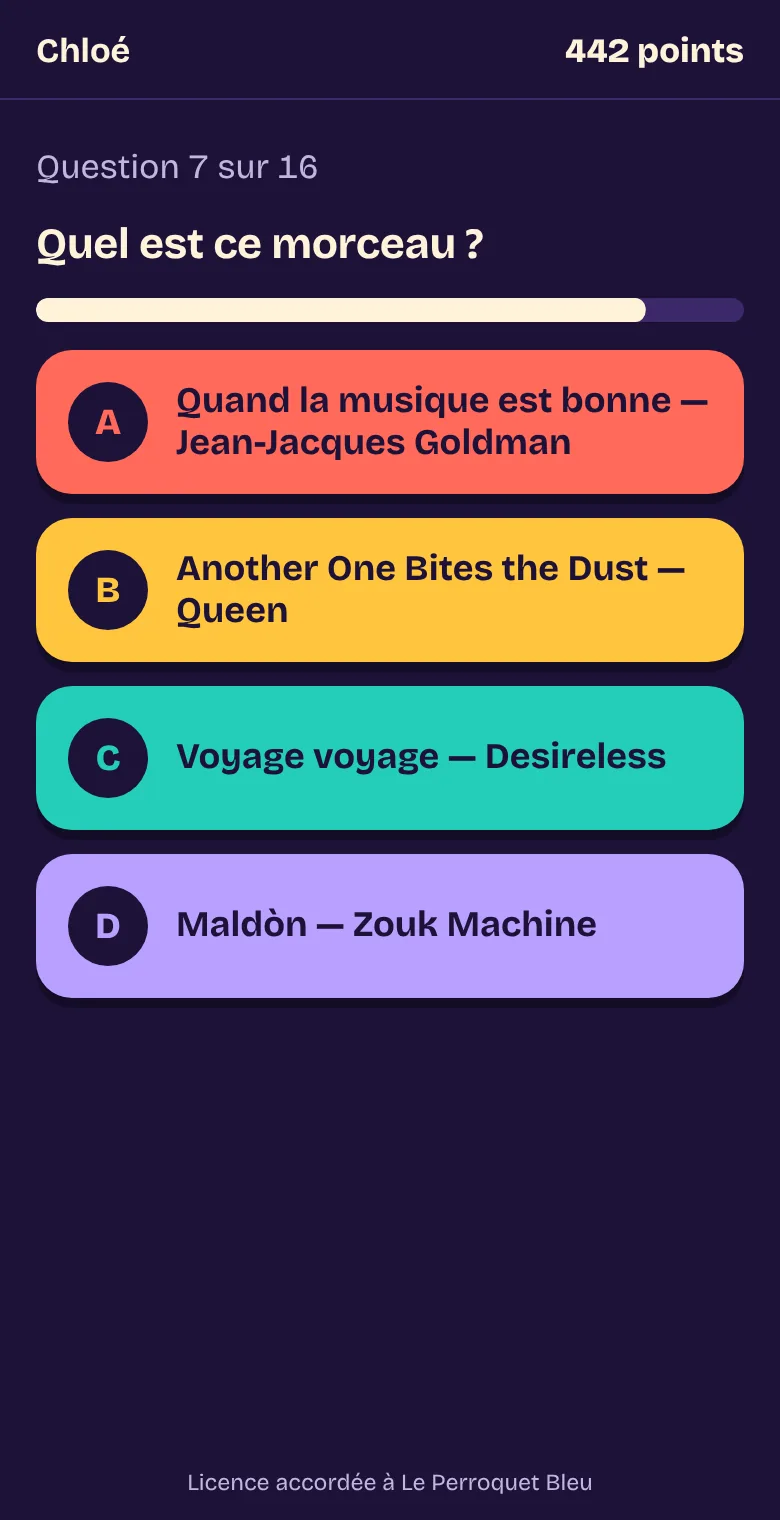
KaraDan' Blind Test: you play the track, each player answers on their phone, and the points add up by themselves.

  • Your music, started with one click
  • Four choices on every phone
  • Points and the speed bonus, counted for you
  • Solo or in teams, with the ranking on the TV

With the Complete plan, the blind test is added to Pro for €5 more per month, and Recherche de fichiers comes free.

Just the blind test, without the karaoke? That works too: the Blind test plan, €6.90 a month or €69 a year. Carton Plein and Bonneteau are included.

The same key opens the karaoke app and the blind test. The app contains no music: you play your own. For now, the blind test screens are in French.

The blind test's public screen during a question: “Which track is this?”, four coloured choices and the timer.
A player's phone: the same question, with the four choices to tap.

Two more games for your nights

With the Complete or Blind test plan, the same key also opens Carton Plein and Bonneteau. Players play on their phones, the TV shows the game, and you stay in control from your computer.

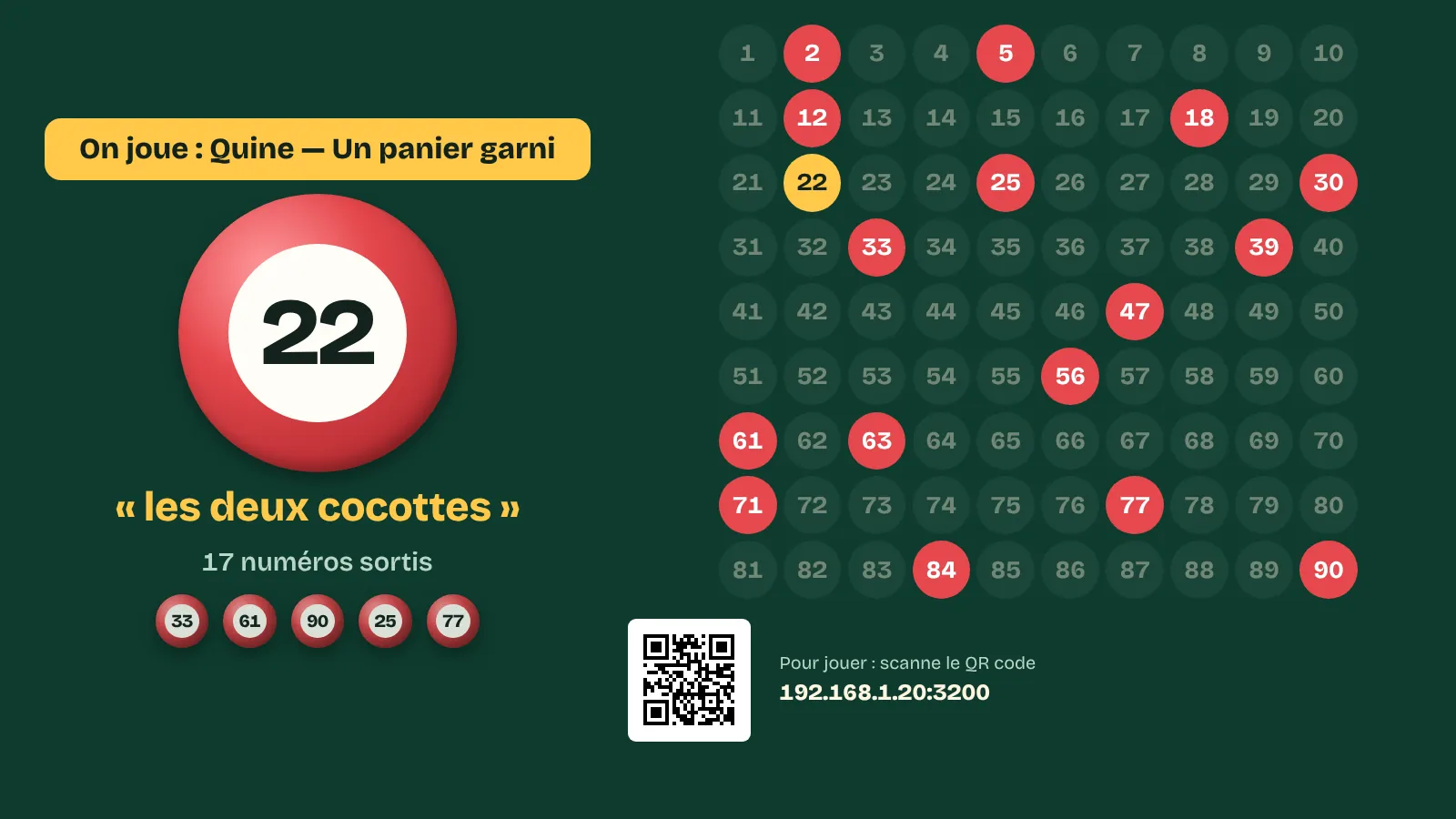
The Carton Plein public screen: the last number drawn, its nickname and the board of 90 numbers.

Carton Plein

Party bingo (French-style lotto) with no cards to hand out: every player has their cards on their phone, and numbers are ticked automatically.

  • One line, two lines and full card, with a prize for each stage
  • Every “Bingo!” checked instantly, numbers called out loud
  • Special games, printable paper cards and a night report

Try it freeMac version

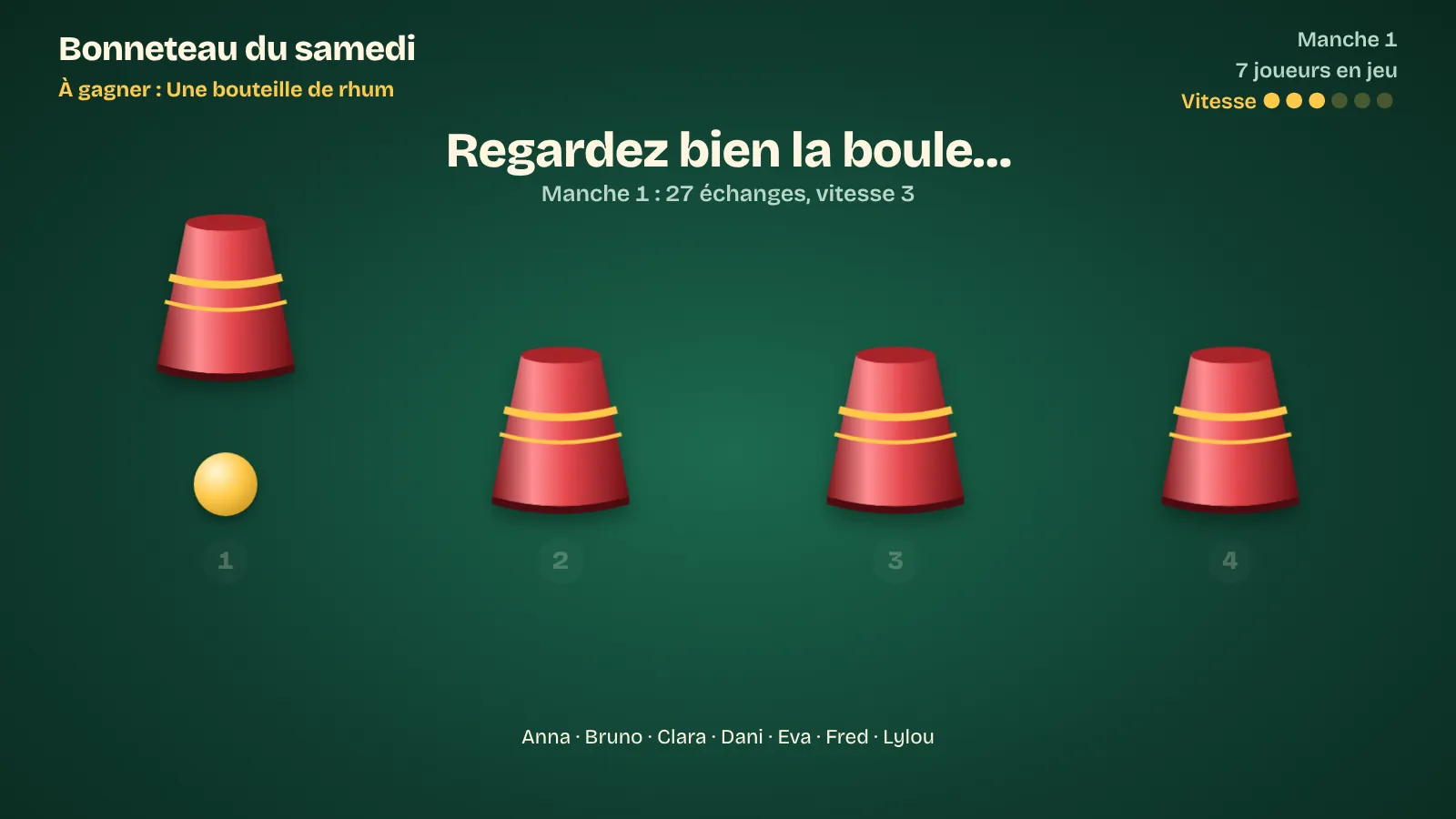
The Bonneteau public screen: the ball shown under one of the cups, just before the shuffle.

Bonneteau

A ball under a cup, the cups shuffle on the TV, and everyone taps the right cup on their phone. The last player standing wins.

  • 3 to 6 cups, and the shuffle speed set live
  • Eliminations, cup-by-cup reveal, a party for the winner
  • The ball's position never leaves your computer: nobody can cheat

Try it freeMac version

Included in the Complete and Blind test plans at no extra cost. Each game can be tried free for 14 days. The games' screens are in French.

See the plans

Recherche de fichiers, the file search app

Find any file on your computer, and put your music library back in order. No subscription: you buy it once.

  • starts with A, V or M
  • *.mp3
  • Artists = e.g. Kassav
  • contains the word, e.g. “quote”
  • duplicate songs
  • empty folders
  • changed this week
By name, the way you think of it
Starts with, contains, ends with, several letters at once, or a pattern such as *.mp3. Accents and capitals don't matter.
Inside the files
A word written inside a text, Word, Excel, PowerPoint or LibreOffice file: the search opens it for you.
By your music tags
Artist, title, album, genre, years. With “Kassav” as the artist, you find every Kassav' track, even when the file is called “track 03.mp3”.
Duplicates, spotted at last
Same name and size, same artist and title, or strictly identical content: you see what is taking up space for nothing.
Tidying up, without risk
Rename to “Artist - Title”, fix missing tags on mp3 files, move, send to the recycle bin. Every action asks for your agreement, and “Undo the last action” puts everything back.
Playlists for your nights
An “Artist - Title” list ready for the blind test, a random draw of tracks with a maximum per artist, and a report on your whole library.

€19once

Free with
the Complete plan

TVA non applicable, art. 293 B du CGI

  • A one-time purchase: no subscription, no end date
  • Nothing to install: it starts with a double-click
  • A key in your name, for your computers: the folder copies onto a USB stick
  • For Windows 10 and 11

The search only reads your files. Nothing is deleted for good: the Windows recycle bin lets you get everything back. For now, its screens are in French.

Download the free trial of Recherche de fichiers

Frequently asked questions

Can I try it before subscribing?

Yes. The trial is complete for 14 days, with no account and no credit card. After that, the app keeps working with a limit of 10 requests per night while you make up your mind. When you subscribe, the key is pasted into Tools › Licence: nothing to reinstall, and your settings, your songbook and your history stay in place.

Monthly or yearly billing: what is the difference?

The features are the same. Monthly, you have no commitment. Yearly, you pay once: you pay for 10 months instead of 12.

How do I stop my subscription?

Use the “Cancel my subscription” link at the bottom of this page, or simply e-mail karadan971@gmail.com. The subscription stops at the end of the period already paid for, at no cost.

What happens if I stop?

The app goes back to limited mode: 10 requests per night. Your songbook, your settings and your regulars' history stay on your computer. The day you come back, everything starts again with the same key, with nothing to reinstall.

Can I change plans?

Yes, at any time and by yourself, through the “Cancel my subscription” link at the bottom of this page, which opens your customer area: switch to yearly to pay less, move up to Complete, or change plan. You keep the same key, and the app reads your new plan by itself as soon as the computer has internet.

How do I receive my key?

Right away: as soon as your payment goes through, the confirmation page shows your key with the download links, and it is also sent to you by email. It is issued in the name you enter at checkout (yours or your venue's), and that name appears in small print in the app (“Licensed to…”). You keep it for as long as you subscribe: it doesn't change at each renewal.

Do I need internet at the venue?

No. During the night everything goes through the venue's Wi-Fi, between the phones and your computer. Internet is used to activate your key, then to read the renewal of your subscription: the app does it by itself as soon as the computer has internet, at home for instance. After each due date it gives you 7 days for that; tethering from your phone is enough.

Do singers have to install an app?

No. They scan the QR code and the page opens in their phone's browser. No account, no download.

What about singers who don't have a phone?

With the Pro plan, they use the kiosk: another computer or a tablet on the same Wi-Fi, opening the address shown in Tools › Kiosk. After each request, the screen clears itself for the next singer. And in every plan, you can type in a request received on paper.

Which karaoke software does it work with?

All of them, because KaraDan' Karaoké doesn't play the songs: it keeps the queue. The “Next” button copies the song and artist of the next request, and you paste them into your software's search.

What if I change computers?

Your key works on one computer with the Basic plan, and on 2 computers with the Pro and Complete plans. To move to a new computer, you release the old one from Tools › Licence, even if it has broken down, then activate the key on the new one. You can do this a few times a year; beyond that, write to us.

Windows shows a warning the first time I run it. Is that normal?

Yes. The app is not digitally signed yet, and Windows says so with the message “Windows protected your PC”. Click “More info”, then “Run anyway”. Windows also asks you to allow the app on your private network: this is what lets phones reach your computer. The included guide (in French) covers both steps.

Does it work on a Mac?

Yes for KaraDan' Karaoké: a Mac version (macOS 11 or later, Apple silicon or Intel) is available next to the Windows one. The first time you open it, macOS asks for an authorisation in System Settings; the steps are in the folder (in French for now). The same key works on Windows and on Mac. KaraDan' Blind Test and Recherche de fichiers run on Windows. Singers' phones can be iPhones or Android phones.

What happens to my singers' data?

It stays on your computer: nicknames, requested songs and the time. A phone number is collected only if you turn on the “WhatsApp group” option; it stays optional for the singer and is erased in one click. Only the activation of your key and the check of your subscription contact our server, with your key, an anonymous fingerprint of the computer and its name.

Is the blind test included?

Yes, in the Complete plan: the same key opens KaraDan' Karaoké and KaraDan' Blind Test. The blind test also has its own free 14-day trial. For now its screens are in French. Only want the blind test? The Blind test plan on its own costs €6.90 a month or €69 a year.

Is Recherche de fichiers a subscription?

No. You buy it once, for €19, and it has no end date. It comes free with the Complete plan, and you keep it even if you stop the subscription later.

Do the apps contain music?

No, neither music nor lyrics. The karaoke app works alongside your usual software, and the blind test plays your own files. Public performance of songs remains subject to your usual licences in your country.

What if the app doesn't suit me?

Try it first: the trial is complete for 14 days. After that, the subscription has no commitment, and the withdrawal and refund conditions are set out in the terms of sale (in French).

Try it at your next karaoke night

14 days with every feature. If your singers take to it, you choose your plan; if not, you delete the folder and its shortcut, and that's it.

On a Mac? Download the Mac version